Gunstoppable Keyboard & Mouse Controls
Default Steam bindings and remapping tips for Gunstoppable
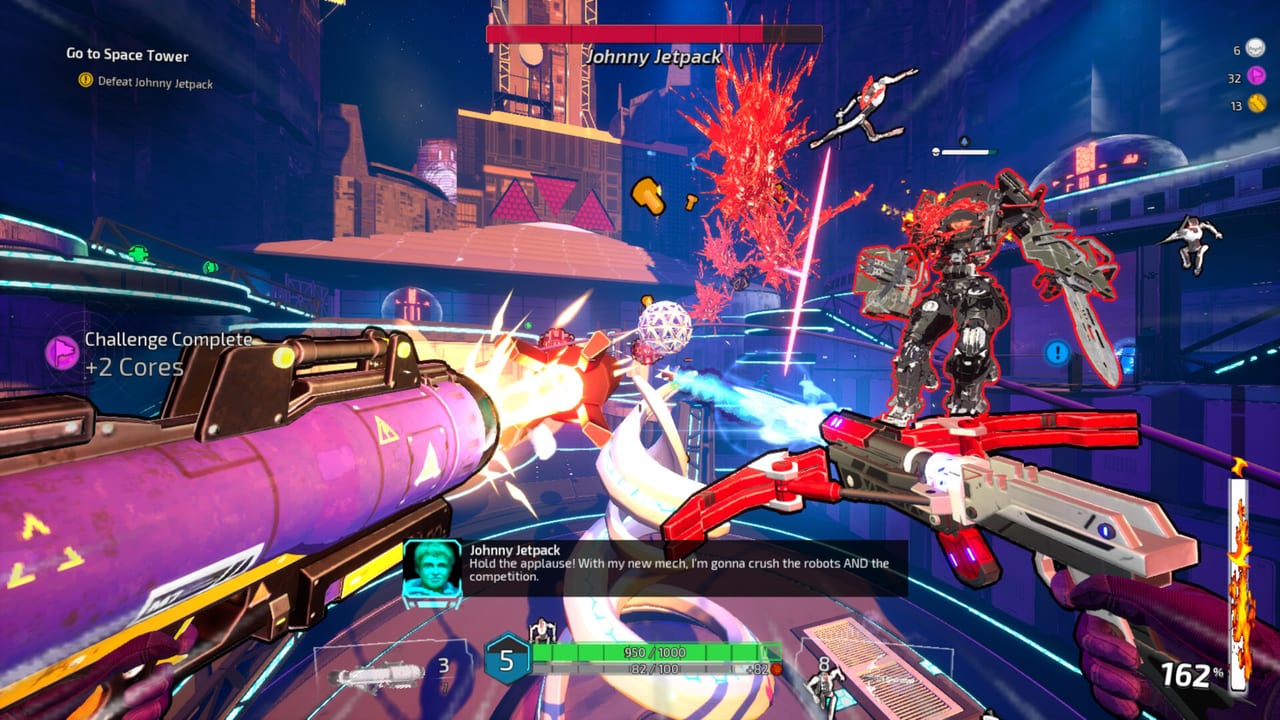
Gunstoppable on Steam expects keyboard and mouse players to move like a speedrunner and shoot like a duelist. CAGE Studios tuned PC bindings around constant motion: every traversal verb feeds the momentum multiplier that makes speed equal damage. This page lists the default layout, explains how each input behaves in combat, and points to remapping options added across demo and launch patches.
Fenix dual-wields two weapons at all times. Your left and right fire buttons can be pressed independently or together, which matters when one gun reloads while the other keeps a dual-wield combo alive. Pair those inputs with parry, grapple, and Reaper Mode on Q once you understand the full loop.
Default movement bindings
Movement uses standard FPS WASD on PC. Gunstoppable adds aggressive vertical and horizontal tech on top of walking and sprinting:
- WASD — Move forward, strafe left/right, move backward. Backpedaling is possible but kills momentum; strafe and forward motion preserve speed better during fights.
- Space — Jump. Chain jumps off slopes and ledges to maintain height before wall-running or grappling.
- Left Shift (typical) — Slide. Enter a slide from sprint speed to duck under projectiles and carry velocity into the next action.
- Grapple key (default varies by patch; often E or middle mouse) — Fire the grapple toward valid surfaces, enemies, or corpses. Recent updates improved corpse grapple for ragdoll launches and reduced floaty pull speeds.
- Wall-run — Automatic when jumping into a wall at angle with sufficient speed; no separate key, but you must approach with momentum from slide or grapple.
- Rail-grind — Jump onto highlighted rails in arenas; movement keys steer along the grind while you fire both weapons.
Read movement and momentum for how wall collisions now store speed instead of zeroing it—a change that makes keyboard strafe patterns more forgiving.
Combat and dual-wield fire
Gunstoppable separates left-hand and right-hand weapons:
- Left mouse button — Fire primary (left-hand) weapon.
- Right mouse button — Fire secondary (right-hand) weapon.
- Both together — Full burst when ammo and heat allow; use staggered firing so one weapon reloads while the other shoots.
- R or weapon-specific reload — Reload the active hand or both depending on settings. Smart reload timing is core to starter builds.
- Weapon swap / scroll wheel — Cycle pickups or focus weapon management when rearranging attachments and augments mid-run.
Damage scales with current speed. Standing still to aim precisely will lose fights; tap fire while sliding and wall-running instead.
Parry
Parry is a timed defensive input—typically F or a mouse side button if remapped. Press parry as enemy melee or certain projectiles connect to trigger impact frames, cancel damage, and open counter windows. Patch 24 reworked parry feedback with stronger hit-stop and melee follow-through animations.
Parry chains into grapple or slide without breaking kill streaks heading toward Reaper Mode. Practice parry during billionaire boss telegraphs where bullet-hell density spikes.
Grapple, slide, wall-run, and rail-grind chain
A typical high-damage keyboard loop looks like this:
- Slide into a group (Shift).
- Jump and wall-run along arena geometry.
- Grapple to the next pack or a fresh corpse for spacing.
- Drop into rail-grind if the arena provides rails, firing both mouse buttons during the ride.
- Parry a telegraphed hit, then finish with Reaper if the chain threshold is met.
Grapple and slide received input-buffer improvements in community patches—less float, snappier direction changes. If a bind feels awkward, move grapple closer to movement keys on the home row.
Reaper Mode and slow time on Q
After racking enough kills in a short window, Reaper Mode becomes available. Press Q to activate manually—this replaced older automatic slow-time triggers so players decide when to spend the chain.
While Reaper is active:
- Enemies and their projectiles move in extreme slow motion.
- Fenix moves, turns, grapples, and fires at normal speed.
- Cluster kills before Reaper ends spike score and keep momentum for the next room.
See Reaper Mode for meter details, optimal timing before boss phases, and how Reaper interacts with black hole weapons and flamethrower augments.
Interaction and run management
- E or interact key — Pick up attachments, talk to Kane the Rat, activate doors, and choose route branches.
- Tab or map key — Review current hex-grid loadout when paused in safe zones.
- Escape — Pause menu, settings, and Steam overlay access.
Between combat rooms, rearrange augments on the hex grid before the next billionaire-funded ambush.
Steam remapping and comfort
Steam Input supports full rebinding for Gunstoppable:
- Remap Q (Reaper), parry, grapple, and slide to mouse side buttons if you use a high-button-count mouse.
- Scroll wheel up/down can swap weapons or trigger utility actions per recent mouse-button support patches.
- Lower mouse sensitivity for rail-grind sections; raise it for quick 180° grapple corrections.
The Steam store page lists comfort options such as aim assist toggles for controller users on PC; keyboard players benefit from FOV and motion-blur sliders in the same menu.
Suggested binds for advanced players
| Action | Default | Advanced tip |
|---|---|---|
| Reaper Mode | Q | Keep on keyboard; do not move to hard-to-reach keys |
| Grapple | E / MMB | Side mouse button frees index finger for firing |
| Parry | F | Place opposite movement hand to avoid claw grip |
| Slide | Shift | Combine with crouch-toggle off for hold-to-slide muscle memory |
| Left / Right fire | LMB / RMB | Never merge into one button—you lose reload stagger |
Related pages
- Controller controls — Xbox layout and Reaper on B
- Controls hub — Overview for all platforms
- Weapons overview — What you are firing with both hands
- Synergy guide — Hex-grid combos that assume fluent inputs
- Tier list — Strongest weapons once bindings feel natural
Keyboard mastery is the fastest path to viral kill counts in Gunstoppable’s fully voiced campaign—practice movement first, then let dual-wield chaos scale with your speed.
Frequently Asked Questions
Quick answers to the most common Gunstoppable questions.
What key activates Reaper Mode on keyboard?
Press Q to manually trigger Reaper Mode when your kill chain is ready. Enemies slow down while Fenix continues at full speed.
Can I bind grapple to a mouse side button?
Yes. Steam supports remapping including side buttons and scroll wheel actions. Many players move grapple off E to a thumb button for faster chains.
How do I fire both weapons on mouse?
Use left mouse button for the left-hand weapon and right mouse button for the right-hand weapon. Hold both for simultaneous fire when ammo allows.
Does wall-run need a separate key?
No. Jump into a wall at speed to wall-run automatically. Build speed with slide and grapple first—see the movement guide for angle tips.
Where are Gunstoppable controls listed in-game?
Open the pause menu from any run to view current bindings. Steam also exposes full remapping through the Steam Input overlay for PC.